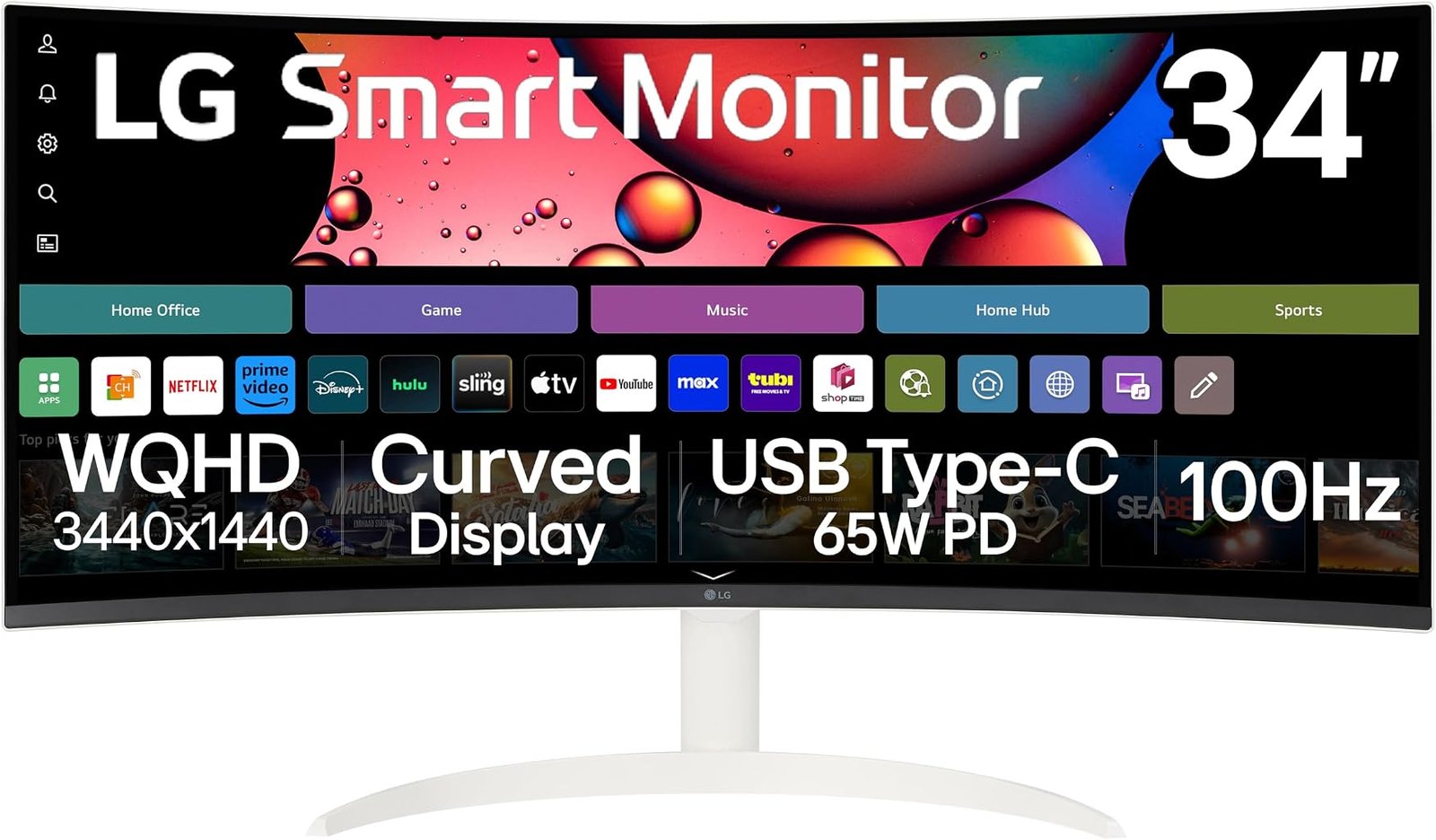
The LG 34SR63QA-W asks a question that conventional desktop monitors rarely confront: what happens when the monitor stops being merely a peripheral?
LG’s answer combines a 34-inch 21:9 curved WQHD display, 3440 × 1440 resolution, a 100Hz refresh rate and HDR10 support with webOS, wireless casting, Bluetooth and USB Type-C connectivity. The result sits somewhere between an ultrawide computer monitor and a compact smart television, without completely surrendering to either identity. According to LG’s current specifications for the 34SR63QA-W, the display also supports up to 99% sRGB color-gamut expression, AirPlay 2, Screen Share and the ThinQ Home Dashboard.
That hybrid character determines nearly every strength and weakness.
Our score is 7.91/10, placing the 34SR63QA-W in Good territory. Customer Sentiment is 7.62, Buyer Confidence reaches 8.88, and Value is 7.79. Those ratings describe a monitor with considerable practical flexibility but a less specialized performance profile than gaming-focused or professional alternatives.
At an evaluated price of $390.91, the proposition rests on consolidation. A buyer is not merely paying for a 34-inch ultrawide panel. The price also covers an operating system capable of streaming without a connected computer, wireless device integration and USB-C functionality intended to reduce desk clutter.
Whether that is worthwhile depends less on benchmark supremacy than on how many separate jobs the monitor will actually perform.
The 34-Inch 21:9 Format Remains the Foundation
Before webOS, streaming applications or wireless features enter the discussion, the 34SR63QA-W is fundamentally a 34-inch ultrawide monitor.
LG specifies a native resolution of 3440 × 1440 in a 21:9 format. That resolution produces approximately 4.95 million pixels, compared with roughly 3.69 million at conventional 2560 × 1440 and 8.29 million at 3840 × 2160 4K.
The arithmetic helps explain why 3440 × 1440 has remained attractive at this size. It offers about 34% more pixels than ordinary 2560 × 1440 while demanding roughly 40% fewer pixels than 4K.
The practical difference is horizontal space.
A 16:9 monitor can comfortably display one large application. A 21:9 screen is better suited to two substantial windows side by side. Documents, browsers, spreadsheets and messaging applications can coexist without the physical bezel dividing a traditional dual-monitor arrangement.
Video editors gain a longer timeline. Audio software can expose more tracks. Large spreadsheets reveal additional columns. Research workflows benefit from placing source material beside the document being written.
That width is one reason the best 34 inch ultrawide monitors can replace two smaller screens for many users. The advantage is not simply that the image is larger. It is that the desktop takes a different shape.
The 34SR63QA-W adds curvature to that equation. The curve draws the outer edges toward the viewer, reducing the sense that a broad screen stretches away at its extremities. Unlike aggressively curved gaming monitors, the design is intended to balance immersion with ordinary desktop work.
100Hz Is a Sensible Middle Ground
The 100Hz refresh rate deserves more attention than it usually receives because it occupies a useful position between basic office displays and expensive high-refresh gaming monitors.
A 60Hz monitor refreshes approximately every 16.67 milliseconds. At 100Hz, the interval falls to 10ms. A 120Hz screen refreshes every 8.33ms, while 240Hz cuts the interval to approximately 4.17ms.
The 34SR63QA-W therefore cannot compete with 165Hz, 180Hz or 240Hz gaming monitors on raw refresh frequency. That is not its objective.
The benefit of 100Hz is broader. Cursor movement appears smoother. Scrolling through long web pages and documents becomes more fluid. Window animations feel less coarse. Casual games can operate above the traditional 60fps ceiling.
Those improvements affect ordinary computing rather than requiring a competitive game to reveal themselves.
This distinction matters when evaluating value. A user spending most of the day writing, researching, editing media and streaming video may gain little from paying for a 240Hz panel. Moving from 60Hz to 100Hz, however, remains perceptible while avoiding much of the cost associated with gaming-specific hardware.
The limitation is equally straightforward. Anyone purchasing specifically for high-frame-rate competitive gaming should look elsewhere. A 100Hz ceiling restricts the monitor to 100 unique refreshes per second even when a gaming PC can render considerably more frames.
For mixed work, entertainment and casual gaming, 100Hz is well judged. For esports, it is not.
webOS Changes What the Monitor Can Do Without a PC
The defining feature of the 34SR63QA-W is not resolution or refresh rate. It is webOS.
LG’s Smart Monitor concept integrates the company’s television-oriented software platform directly into the display. That means the monitor can access streaming services and networked functions without relying on a connected computer.
LG describes its broader Smart Monitor platform as supporting streaming, music, wireless casting and access to work services through webOS.
The practical effect is subtle but meaningful.
A conventional monitor becomes useless as an entertainment device when the connected laptop leaves the desk unless another source is attached. A Smart Monitor retains independent functionality. It can remain connected to Wi-Fi and operate more like a television.
That changes the economics for small rooms, apartments, bedrooms, dormitories and multipurpose offices. A single screen can act as a workstation during working hours and an independent streaming display afterward.
It also removes an unnecessary computing layer. Watching a streaming service does not require waking a laptop, connecting a separate streaming stick or leaving a desktop PC running.
This is not computational independence in the conventional PC sense. webOS does not turn the monitor into a full desktop computer. It provides a television-style application environment and selected productivity capabilities.
The distinction prevents inflated expectations. The 34SR63QA-W can function without a PC for entertainment and some connected services, but it does not replace a Windows, macOS or Linux machine for demanding desktop software.
AirPlay 2 and Screen Share Add Wireless Flexibility
Wireless integration expands the monitor’s usefulness beyond built-in streaming.
LG lists AirPlay 2, Screen Share and Bluetooth among the 34SR63QA-W’s main features. AirPlay 2 allows compatible Apple devices to send supported media or mirror content to the display over the same network.
LG specifies that an Apple device must share the monitor’s Wi-Fi network and states compatibility requirements of iOS 12.3 or later or macOS 10.14.5 or later.
This matters because wireless casting changes how casually a screen can be used.
A photograph, presentation, browser page or video can move from a smaller device to the 34-inch display without rearranging physical connections. For households where several people use different devices, that flexibility can be more useful than adding another conventional video input.
Bluetooth extends the same logic to wireless peripherals and audio-related use.
None of this replaces wired connections where low latency, image consistency or sustained desktop use matters. A USB-C or HDMI connection remains the cleaner choice for hours of workstation activity. Wireless integration is most persuasive for transient tasks: sharing, streaming and moving content onto the larger screen quickly.
USB Type-C Addresses the Modern Laptop Desk
USB-C is among the 34SR63QA-W’s most practical hardware features.
LG’s current U.S. product page confirms USB Type-C with power delivery alongside two HDMI connections, USB ports and a headphone jack.
The importance of USB-C is not the shape of the connector. It is consolidation.
On compatible laptops, one cable can handle display connectivity while also delivering power. That reduces the need to connect a separate charger every time the computer arrives at the desk.
For hybrid workers, this changes the daily ritual. A laptop can move between travel and desktop use with less cable management. The monitor effectively becomes part of the docking arrangement rather than merely receiving a video signal.
That advantage deserves particular weight when comparing the 34SR63QA-W with inexpensive ultrawide displays. A lower-priced model may offer the same 3440 × 1440 resolution but require separate power, video and peripheral connections.
USB-C does not automatically make every desk elegant, and compatibility still depends on the connected computer’s capabilities. Yet the connection standard aligns closely with the Smart Monitor philosophy: fewer dedicated devices and less friction between work and entertainment.
HDR10 Is Present, but Expectations Should Be Measured
LG lists HDR10 support and up to 99% sRGB color-gamut expression. Those specifications are useful, but they should not be interpreted as proof of high-end HDR performance.
HDR10 describes the ability to accept and process HDR content. It does not, by itself, establish peak brightness, black level, local-dimming sophistication or color volume.
That distinction matters.
A monitor can accept an HDR10 signal without reproducing the dramatic luminance range associated with premium OLED or mini-LED displays. Genuine high-impact HDR requires more than software compatibility.
The 34SR63QA-W is better understood as a versatile WQHD monitor with HDR support rather than a specialist HDR display.
Its up-to-99% sRGB specification is more directly relevant to ordinary desktop use. sRGB remains widely used for web content, general computing and mainstream digital imagery. Broad sRGB coverage supports credible everyday color reproduction without positioning the monitor as a reference-grade professional display.
Photographers, colorists and print professionals requiring tightly controlled color accuracy should still seek displays built and validated for those workloads. For documents, web graphics, streaming and ordinary creative tasks, the LG’s stated gamut coverage is appropriate to its category.
Streaming on an Ultrawide Has an Aspect-Ratio Catch
The Smart Monitor concept sounds particularly attractive for entertainment, but the 21:9 panel introduces an overlooked complication: not all video is ultrawide.
Traditional television content is commonly produced for 16:9. Displaying a 16:9 image at its correct aspect ratio on a 21:9 screen leaves unused space at the sides.
Cinematic material can fit an ultrawide panel more naturally, depending on the source aspect ratio and how a streaming application handles presentation. Television series, news, sports and much online video remain more closely associated with 16:9.
That creates an unusual trade.
The same width that makes the 34SR63QA-W productive for desktop multitasking is not always used by streaming content. A 34-inch ultrawide is therefore not equivalent to a 34-inch 16:9 television in perceived picture area for ordinary TV programming.
This does not undermine webOS. It merely changes how its entertainment capability should be judged.
For a desk viewed at close range, the combination can work very well. For a room where the screen will frequently function as a television viewed from several feet away, a larger 16:9 display may use its physical dimensions more efficiently.
The White Design Changes the Visual Character
The 34SR63QA-W is finished in Alpine White, a departure from the black and dark-gray finishes that dominate the monitor market. LG’s current product listing explicitly identifies the color as Alpine White.
Color is not a performance metric, but monitor design affects how a large object integrates into a room.
A 34-inch ultrawide occupies substantial visual space even when switched off. A white chassis can blend more naturally with light-colored furniture, minimalist home offices and rooms where a black gaming-style display would appear unusually heavy.
That makes the design relevant to the Smart Monitor identity. This is a screen that may live in bedrooms, shared rooms and home offices rather than dedicated PC stations.
The styling also communicates what the product is not. It does not present itself as an aggressive gaming monitor covered in angular accents and lighting. Nor does it resemble a severe corporate workstation.
The aesthetic is domestic, which fits its combination of work and streaming functions.
Gaming Is Secondary, Not Absent
A 100Hz ultrawide can certainly play games.
The 3440 × 1440 resolution provides a wider field in PC titles that support 21:9, while the 100Hz ceiling allows smoother output than conventional 60Hz monitors. Casual racing, strategy games, role-playing titles and slower single-player experiences can all benefit from the format.
Yet gaming specialization stops there.
The 34SR63QA-W is not positioned as an UltraGear display. Its core proposition is smart functionality and multipurpose use rather than maximum motion performance.
Players interested in competitive shooters should prioritize monitors with substantially higher refresh rates and gaming-oriented response characteristics. Those interested in high-impact HDR gaming may prefer OLED or mini-LED alternatives with more advanced contrast behavior.
The 34SR63QA-W instead suits the user who sometimes games on the same screen used for work and streaming.
That distinction is particularly relevant when comparing candidates for the best 34 inch ultrawide monitors. Category leadership depends on the job. A 240Hz OLED can dominate gaming criteria while being unnecessarily expensive or awkward for ordinary office use. A productivity monitor can offer superior docking features while providing weaker entertainment capabilities.
The LG sits deliberately between categories.
Productivity Is Where the Format Makes the Most Sense
The strongest everyday argument for the 34SR63QA-W is productivity.
At 3440 × 1440, the desktop offers enough width for meaningful side-by-side work without requiring the operating-system complexity and physical separation of two monitors.
Researchers can keep source material beside a draft. Financial users can expose more spreadsheet columns. Writers can position reference documents alongside an editor. Developers can place an application beside documentation or diagnostic output.
The 100Hz refresh rate improves the fluidity of scrolling and interface movement without demanding gaming-class graphics hardware.
USB-C simplifies laptop connection. webOS allows the display to retain utility after the work computer disconnects. AirPlay 2 and Screen Share provide additional routes for moving information onto the screen.
These features form a coherent pattern rather than an arbitrary specification collection. The monitor is designed around transitions: from laptop to standalone streaming, from wired to wireless content, and from work to entertainment.
That versatility is the strongest argument behind its 7.79 Value score.
Warranty Coverage Is Relatively Modest
Ownership confidence is helped by LG’s established support infrastructure, but the standard U.S. warranty period deserves attention.
The LG support page for the 34SR63QA-W lists one year of labor coverage and one year of parts coverage.
A one-year warranty is not unusual in consumer electronics, but longer coverage would strengthen the ownership proposition for a monitor expected to function simultaneously as a work display and entertainment device.
This matters because multipurpose hardware can accumulate more operating hours than a conventional office monitor. A screen used for eight hours of work and several additional hours of streaming may remain active for a substantial portion of each day.
Buyer Confidence still reaches 8.88, the highest of our four ratings. That reflects a product whose actual identity is easy to understand, with a clear manufacturer support channel and a documented feature set.
The warranty period simply prevents that confidence score from being interpreted as an absence of trade-offs.
Understanding Our 7.91/10 Score
Our overall score of 7.91/10 places the LG 34SR63QA-W in Good territory.
That rating reflects versatility rather than dominance in one performance category.
Customer Sentiment stands at 7.62, the lowest of the four figures. The score fits a product whose appeal depends strongly on individual workflow. Buyers who need ultrawide productivity, USB-C and independent streaming functionality receive a more coherent package than users who care only about raw panel performance.
Buyer Confidence is considerably stronger at 8.88. LG clearly defines the monitor’s main capabilities, and the combination of 3440 × 1440 resolution, 100Hz refresh, webOS, HDR10, wireless connectivity and USB-C forms a credible multipurpose proposition. The manufacturer also maintains a dedicated support page and warranty documentation for the model.
Value scores 7.79 at the evaluated $390.91 price.
That figure is positive but measured. Buyers are paying more than the bare cost of pixels. webOS, wireless functions and USB-C account for part of the proposition. Someone who already owns a streaming device, never casts content wirelessly and uses a desktop PC rather than a USB-C laptop may receive little benefit from those additions.
The scoring difference is therefore coherent: confidence in the product is higher than its universal value.
Strengths and Drawbacks
The 34SR63QA-W’s strongest attributes are practical rather than spectacular:
- 3440 × 1440 resolution provides substantially more horizontal workspace than conventional 16:9 QHD.
- The 21:9 format supports efficient side-by-side multitasking.
- A 100Hz refresh rate offers smoother everyday motion than traditional 60Hz office displays.
- webOS allows streaming and selected connected functions without a PC.
- AirPlay 2, Screen Share and Bluetooth broaden wireless device integration.
- USB Type-C with power delivery reduces cable clutter for compatible laptops.
- HDR10 support expands media compatibility.
- Up to 99% sRGB color-gamut expression suits mainstream desktop and web-oriented work.
- The Alpine White design gives the large monitor a less gaming-oriented visual presence.
- Two HDMI connections broaden compatibility with external sources.
The drawbacks follow directly from the same hybrid design:
- A 100Hz ceiling is modest for competitive gaming.
- HDR10 compatibility should not be confused with premium HDR hardware.
- A 21:9 screen does not use its full width for much 16:9 streaming content.
- The curved format will not suit every professional visual workflow.
- The one-year U.S. parts-and-labor warranty is relatively restrained.
- Users who do not need webOS or wireless casting are paying for features they may rarely use.
- The 3440 × 1440 resolution provides less pixel density and workspace than a similarly sized 4K display, although it also requires fewer graphics resources.
- The monitor’s hybrid character means specialists can find stronger alternatives for gaming, professional color work or television use.
The pattern is consistent: flexibility is the advantage, specialization the sacrifice.
Who Should Buy the LG 34SR63QA-W?
The strongest buyer profile is a home-office user who wants one large screen to handle work and entertainment without surrounding it with additional devices.
A laptop user stands to benefit particularly strongly. USB-C reduces connection friction, while the 21:9 desktop offers enough width to replace a dual-screen arrangement in many workflows. After the laptop disconnects, webOS keeps the display useful for streaming.
Students living in small spaces form another logical audience. A single display can handle coursework, media consumption, wireless casting and casual gaming without requiring both a monitor and television.
The model also makes sense for users who dislike the visual language of gaming equipment. Its white finish and smart-display orientation make it easier to integrate into multipurpose rooms.
The weaker fit is the specialist.
Competitive players should favor higher-refresh gaming monitors. Professional photographers and colorists should prioritize displays with more rigorous color-oriented specifications and calibration capabilities. Users primarily seeking a television should consider whether a 16:9 screen would make better use of physical screen area for conventional video.
A desktop-PC user with no interest in streaming applications or wireless functions can also find simpler ultrawides that devote more of their cost to panel performance rather than smart features.
Final Considerations
The LG 34SR63QA-W is most coherent when viewed not as a monitor with television features bolted onto it, but as a desktop display designed to remain useful after the computer is disconnected.
That distinction explains the hardware.
The 34-inch 3440 × 1440 panel supplies the workspace. The 21:9 aspect ratio makes side-by-side applications practical. The 100Hz refresh rate raises everyday fluidity above the traditional office baseline. USB-C simplifies laptop use. AirPlay 2, Screen Share and Bluetooth reduce dependence on physical connections. webOS gives the display an independent entertainment identity.
None of those elements individually establishes the 34SR63QA-W as a category specialist. Together, however, they create a credible multipurpose screen.
Our 7.91/10 overall score reflects that balance. Customer Sentiment at 7.62 is positive but restrained because the monitor’s appeal depends heavily on whether its hybrid features match the buyer’s routine. Value at 7.79 similarly recognizes useful hardware at the evaluated $390.91 price without ignoring the availability of cheaper conventional ultrawides.
Buyer Confidence at 8.88 is the strongest rating because the monitor’s purpose is unusually legible. It is not masquerading as a professional reference display or high-refresh esports monitor. It is a curved ultrawide workstation with a smart operating system and enough connectivity to move comfortably between computers, wireless devices and independent streaming.
The one-year U.S. warranty is less generous than the rest of that proposition, and HDR expectations should remain controlled. The 100Hz refresh rate also establishes a firm boundary for gaming buyers.
Yet those limitations do not undermine the central idea.
Among the best 34 inch ultrawide monitors, the LG 34SR63QA-W deserves consideration when versatility carries more weight than maximum performance in any single discipline. It can replace a basic dual-monitor arrangement, reduce the number of cables attached to a laptop and remove the need for a separate streaming device in a small room.
That combination is where the evaluated $390.91 price makes the most sense. A buyer who needs only an ultrawide computer display can find more focused options. A buyer who needs an ultrawide display, USB-C workstation connection and independent smart-screen functionality is evaluating a different equation.
The 34SR63QA-W’s appeal ultimately comes from reducing boundaries. Work and entertainment share one panel. Wired and wireless sources coexist. A laptop can arrive in the morning and leave in the evening without rendering the screen inert.
For the right desk, that flexibility is more useful than another headline specification. The LG does not attempt to win a contest of refresh rates, brightness figures or gaming response claims. Its 7.91/10 score instead recognizes a more ordinary but increasingly relevant achievement: fitting several legitimate uses into one 34-inch screen without allowing any single one to overwhelm the rest.