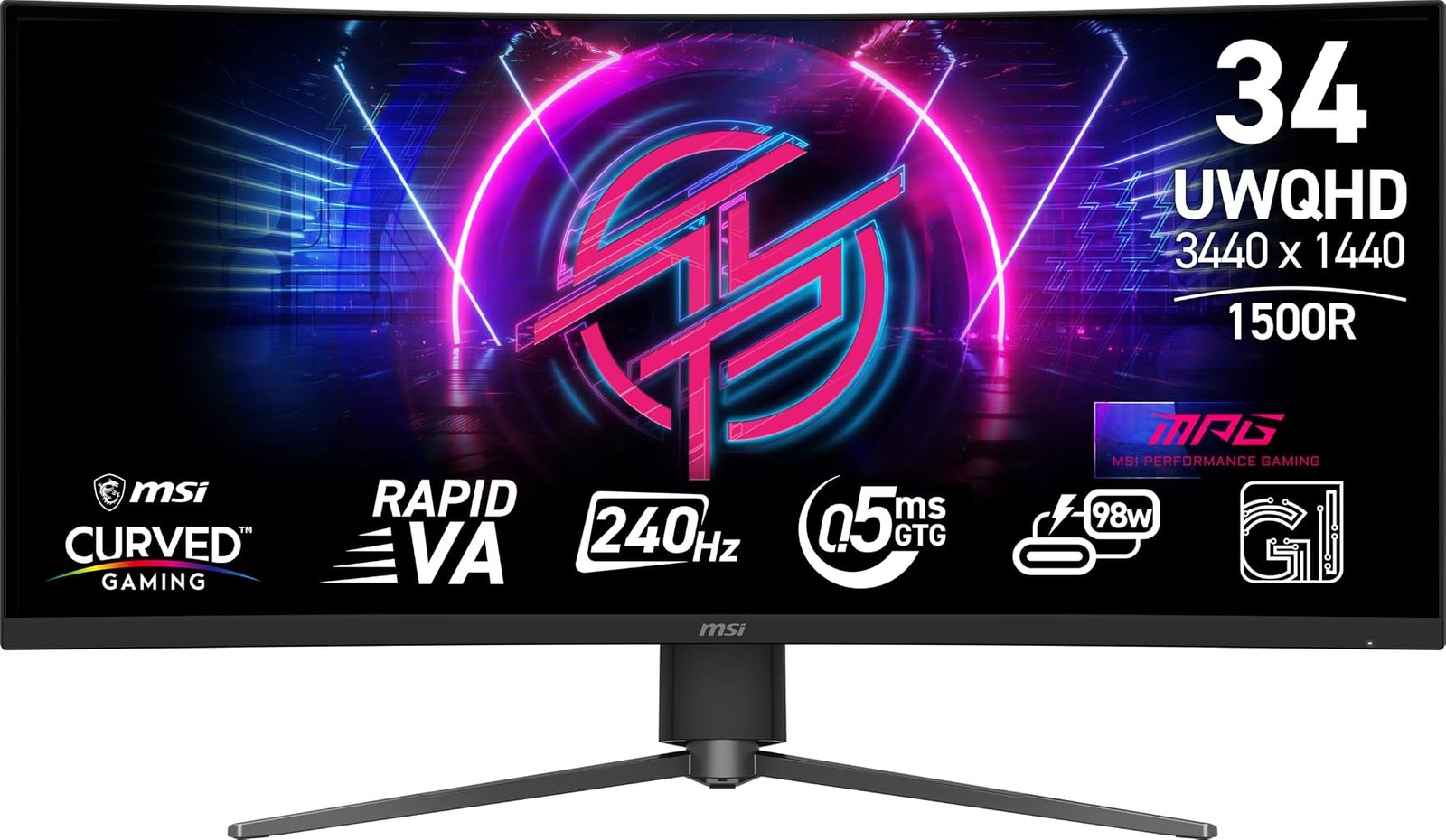
The MSI MPG 346CQRF X24 enters a crowded part of the monitor market with a specification combination that would have looked unusually ambitious only a few product cycles ago: a 34-inch 3440 × 1440 ultrawide panel, 240Hz refresh rate, 0.5ms minimum gray-to-gray response claim, 1500R curvature, Adaptive-Sync, HDMI 2.1 and USB-C with 98W power delivery.
Yet the more revealing detail is the panel technology. Rather than using OLED, MSI builds the MPG 346CQRF X24 around Rapid VA. That decision creates a different balance of cost, contrast, brightness, motion behavior and ownership considerations. MSI specifies a 4000:1 static contrast ratio, 400 cd/m² SDR brightness and 400 cd/m² peak HDR brightness, while the monitor carries VESA DisplayHDR 400 certification.
Our score is 8.28/10, placing the monitor in Very Good territory. Customer Sentiment is also 8.28, Buyer Confidence reaches 8.45, and Value stands at 8.15. The narrow spread between those figures is revealing: the monitor does not depend on one spectacular characteristic to rescue a compromised package. Its appeal is broader, built around a combination of speed, ultrawide resolution, connectivity and a comparatively accessible evaluated price of $359.
That price is central to the assessment. At $359, a 240Hz 3440 × 1440 display is competing not merely with other gaming ultrawides but with ordinary 1440p monitors, slower productivity ultrawides and entry-level high-refresh displays.
The MPG 346CQRF X24 therefore poses a practical question: how much of the modern ultrawide gaming experience can Rapid VA deliver without moving into OLED pricing?
A 34-Inch Ultrawide With a Clear Gaming Bias
The fundamental geometry is familiar but effective.
MSI’s official MPG 346CQRF X24 specifications identify a 34-inch Rapid VA panel with 3440 × 1440 resolution, a 21:9 aspect ratio and 1500R curvature. The active display area measures 797.22 × 333.72mm, while pixel pitch is listed at 0.23175mm.
A 3440 × 1440 image contains approximately 4.95 million pixels. Conventional 2560 × 1440 contains about 3.69 million, while 3840 × 2160 4K contains roughly 8.29 million.
Those numbers explain much of ultrawide WQHD’s durability as a gaming format. It renders approximately 34% more pixels than ordinary 1440p, providing extra horizontal image area, but about 40% fewer pixels than 4K.
That difference has direct consequences for graphics performance. A GPU trying to sustain very high frame rates has considerably fewer pixels to render than it would at native 4K.
The format also changes the composition of compatible games. A properly supported 21:9 title can display more horizontal scene information than a conventional 16:9 monitor. Racing games, simulators, third-person adventures and first-person titles can all make effective use of the additional width.
The 1500R curve is comparatively measured next to the extreme 800R geometry found on some OLED gaming ultrawides. It remains obvious, but it does not pull the sides toward the viewer as dramatically.
For a 34-inch screen, that moderation makes sense. The display remains curved enough to address the broad physical width of 21:9 without turning ordinary desktop work into an unusually distorted visual experience.
Rapid VA Defines the Trade-Off
Panel type is one of the most consequential specifications on any monitor, yet it is frequently reduced to an acronym.
VA technology has traditionally emphasized contrast. MSI specifies a static contrast ratio of 4000:1 for the MPG 346CQRF X24, substantially higher than the roughly 1000:1 class commonly associated with conventional IPS desktop panels.
Higher native contrast matters in dark scenes because black areas can appear deeper relative to bright portions of the image. It cannot reproduce OLED’s pixel-level black control, but it gives VA an advantage over many ordinary IPS implementations when dark-room gaming is involved.
The trade historically associated with VA is pixel-transition performance, particularly in darker transitions. Slow transitions can create smearing behind moving objects even when a monitor carries a high refresh-rate specification.
MSI attempts to address that weakness through what it calls Rapid VA and quotes a minimum 0.5ms GtG response time. The manufacturer specifically positions the combination of 240Hz and 0.5ms minimum response for fast-moving genres such as shooters, fighting games, racing simulations and strategy titles.
The wording matters. A manufacturer’s minimum gray-to-gray figure does not mean every pixel transition takes 0.5ms, nor does it represent total system latency. Actual response behavior varies according to transition type, overdrive settings, refresh rate and other factors.
The figure is therefore best treated as a manufacturer specification rather than a universal measurement.
Even so, the underlying objective is clear: this is not an ordinary office-oriented VA panel with a gaming badge. MSI has designed the display around high-refresh operation.
240Hz at 3440 × 1440 Is the Main Performance Story
A 240Hz refresh rate allows the monitor to refresh every 4.17 milliseconds.
For comparison:
- 60Hz corresponds to approximately 16.67ms per refresh.
- 100Hz corresponds to 10ms.
- 120Hz corresponds to approximately 8.33ms.
- 144Hz corresponds to approximately 6.94ms.
- 165Hz corresponds to approximately 6.06ms.
- 240Hz corresponds to approximately 4.17ms.
The progression is not linear in perceived benefit. Moving from 60Hz to 120Hz cuts the refresh interval in half, while moving from 120Hz to 240Hz halves it again but starts from an already faster baseline.
That makes 240Hz most relevant to players whose computers can generate high frame rates consistently.
The hardware requirement should not be underestimated. Rendering 3440 × 1440 at 240 frames per second means producing almost 1.19 billion rendered pixels each second before accounting for the complexity of lighting, geometry, textures and effects.
A demanding single-player title at maximum settings may operate nowhere near 240fps, even on expensive graphics hardware. Competitive games using lighter settings have a far better chance.
The monitor remains useful below 240fps. Its ultrawide format, VA contrast and Adaptive-Sync still matter at 80, 100 or 144fps. Yet buyers should recognize that part of the $359 purchase is paying for refresh headroom.
A 240Hz monitor is most rational when the PC can exploit it at least some of the time.
Adaptive-Sync Covers the Space Between Perfect Frame Rates
Gaming performance rarely remains fixed.
A scene containing several characters, heavy particle effects or complex lighting can reduce frame rate. Moving into a simpler environment can raise it again. Fixed-refresh displays and fluctuating GPU output do not naturally stay synchronized.
MSI lists an Adaptive-Sync operating range of 48-240Hz. The technology synchronizes display refresh behavior with changing GPU output to reduce tearing and the visual disruption associated with mismatched timing.
This is particularly useful on a 3440 × 1440 monitor because frame-rate variation is realistic even with powerful hardware.
The ideal scenario is not necessarily 240fps at every moment. A game moving smoothly through a broad variable-refresh range can produce a more coherent experience than one oscillating around a rigid refresh target with synchronization disabled.
Adaptive-Sync therefore supports the monitor’s broader performance argument. The 240Hz ceiling attracts attention, but the variable range makes that ceiling more usable across games with very different workloads.
DisplayHDR 400 Has Defined Limits
HDR branding requires careful interpretation.
The MPG 346CQRF X24 is VESA DisplayHDR 400 certified. MSI specifies 400 cd/m² brightness in SDR and 400 cd/m² peak brightness for HDR. The monitor also carries a 4000:1 static contrast specification.
DisplayHDR 400 establishes a baseline, but buyers should not confuse it with the capabilities of high-output mini-LED monitors or self-emissive OLED displays.
The MPG 346CQRF X24’s advantage is its native VA contrast rather than extreme HDR luminance or pixel-level light control.
That distinction affects actual content. Dark scenes can benefit from the 4000:1 contrast ratio, while the 400-nit brightness specification provides more headroom than many basic office monitors. Yet bright HDR highlights cannot reach the intensity of displays designed around substantially higher peak luminance.
HDR should therefore be viewed as a supporting feature rather than the central reason to choose this monitor.
The monitor’s color specifications add context. MSI lists 85% Adobe RGB, 85% DCI-P3 and 110% sRGB coverage using the CIE 1976 standard, along with support for 1.07 billion colors through 8-bit plus FRC operation.
Those figures suggest a display designed for vivid gaming and multimedia rather than a narrowly calibrated professional-color workflow.
HDMI 2.1 Is More Useful Than a Legacy Port List Suggests
Connectivity is one of the strongest parts of the MPG 346CQRF X24.
MSI specifies two HDMI 2.1 ports capable of 3440 × 1440 at up to 240Hz, one DisplayPort 1.4a connection using HBR3, and USB Type-C with DisplayPort Alt Mode and up to 98W power delivery. The USB hub adds two USB 2.0 Type-A ports and one USB 2.0 Type-B connection, while audio output is handled by a headphone jack.
This is a substantially more modern arrangement than a gaming monitor that assumes one desktop PC will remain attached permanently.
HDMI 2.1 gives high-bandwidth sources a straightforward route into the display. DisplayPort 1.4a remains appropriate for a gaming desktop. USB-C changes the workstation equation.
A compatible laptop can send video through DisplayPort Alt Mode while receiving up to 98W of power. That can reduce a desk from separate video and charging cables to a single USB-C connection.
For someone using a gaming desktop after hours and a work laptop during the day, that is not a decorative extra. It changes the monitor from a gaming-only endpoint into part of the desk’s connection infrastructure.
The 98W figure is particularly useful because it is sufficient for many productivity laptops, although high-performance mobile workstations and gaming notebooks can require more power under heavy loads.
KVM Makes the USB-C Port More Meaningful
USB-C becomes more useful when combined with the monitor’s KVM capability.
MSI describes its KVM function as allowing multiple devices to be controlled through one keyboard, mouse and monitor.
This feature addresses a common mixed-device problem.
Consider a desk containing a personal gaming desktop and company laptop. Without KVM functionality, switching computers can require moving keyboard and mouse connections, maintaining separate peripherals or adding an external switch.
An integrated KVM can simplify that arrangement.
The feature does not make the monitor a docking station in every respect, and USB 2.0 peripheral speeds are modest by current standards. A user moving large files to fast external storage would prefer a faster USB interface.
For keyboards, mice and ordinary peripherals, however, USB 2.0 bandwidth is rarely the limiting factor.
The broader design logic is sound: DisplayPort or HDMI handles the gaming desktop, USB-C accommodates a laptop, and KVM reduces peripheral duplication.
That makes the MPG 346CQRF X24 more credible as an all-day monitor than its 240Hz specification initially suggests.
Console Support Is Better Than the Ultrawide Shape Implies
Ultrawide monitors are primarily PC-oriented because mainstream consoles generally target 16:9 rather than native 21:9 presentation.
MSI nevertheless includes a dedicated Console Mode. Its specifications list support for 1080p at 60Hz and 120Hz, 1440p at 60Hz and 120Hz, HDMI CEC, and VRR support for PlayStation 5 and Xbox.
MSI also states that its HDMI 2.1 implementation provides up to 48Gbps bandwidth and supports VRR and ALLM for console gaming up to 120Hz.
That is useful connectivity, but geometry still imposes a limitation.
A 16:9 console image cannot naturally fill a 21:9 screen without cropping or distortion. Correct presentation therefore leaves unused horizontal screen area.
The monitor can be technically well equipped for consoles while remaining physically better suited to PC gaming. Those two statements are not contradictory.
A buyer using both platforms receives meaningful console support. A console-only buyer is paying for ultrawide width that the console cannot fully exploit.
AI Vision and Gaming Features Need Proper Perspective
MSI includes several software-assisted gaming features under its Gaming Intelligence branding.
AI Vision is designed to reveal detail in dark areas while adjusting brightness and color saturation. AI Crosshair can change the aiming reticle color when it would otherwise blend into the background. Optix Scope provides an on-screen magnification function.
These features will divide opinion.
For single-player games, visibility adjustments can make dark environments easier to read. Competitive players may find configurable crosshairs or magnification useful where game rules permit such display-side aids.
Yet none of these features should overshadow panel fundamentals.
Resolution, refresh rate, response behavior, contrast and adaptive synchronization affect almost every frame. A software crosshair does not.
The Gaming Intelligence application is arguably more broadly useful because MSI allows monitor settings to be adjusted through keyboard and mouse rather than forcing every change through physical monitor controls.
That is mundane compared with “AI” branding, but everyday usability often benefits more from mundane improvements.
Ergonomics Are Better Than Tilt Alone
The physical adjustment range is another area where abbreviated retailer descriptions can undersell the monitor.
MSI specifies tilt from -5 to 15 degrees, swivel from -30 to 30 degrees and height adjustment from 0 to 110mm. A 100 × 100mm VESA mount is also supported. The monitor weighs 7.9kg without packaging and measures 808 × 278.3 × 537.9mm with its stand.
Height adjustment matters particularly on an ultrawide.
A screen this broad becomes uncomfortable when positioned too high or low because the user cannot compensate simply by changing viewing angle toward one small area. Proper vertical placement keeps the broad display within a natural viewing range.
Swivel is similarly useful for desk alignment, while VESA compatibility allows the supplied stand to be replaced with an appropriate monitor arm.
The 7.9kg weight should be considered when choosing an arm. Buyers should verify that both the monitor’s weight and 34-inch curved dimensions fall within the arm manufacturer’s specifications.
Where It Fits Among the Best 34 Inch Ultrawide Monitors
The phrase best 34 inch ultrawide monitors covers products pursuing very different objectives.
OLED models emphasize black levels, extremely rapid pixel transitions and per-pixel illumination. Professional ultrawides may prioritize color accuracy, Thunderbolt connectivity or workspace management. Lower-cost models often sacrifice refresh rate or USB-C functionality to reach a lower price.
The MPG 346CQRF X24 follows a different path.
Its Rapid VA panel emphasizes native contrast while avoiding the static-image aging concerns associated with OLED. Its 240Hz refresh rate targets serious gaming. USB-C with 98W power delivery and KVM support make it practical for mixed laptop and desktop use. HDMI 2.1 expands high-refresh connectivity.
The $359 evaluated price then changes how those characteristics should be judged.
At that level, the monitor does not need to defeat premium OLED displays on black level or pixel response. It needs to provide enough of the high-refresh ultrawide experience to make the price difference meaningful.
Our assessment is that it does.
Understanding Our Scores
Our score of 8.28/10 places the MSI MPG 346CQRF X24 in Very Good territory.
Customer Sentiment is also 8.28. The identical figure is fitting because the monitor’s strengths are easy to encounter in ordinary ownership: ultrawide space, high refresh capability, strong native contrast and broad connectivity all affect regular use rather than existing only in specialized test conditions.
Buyer Confidence reaches 8.45, the highest of our four ratings.
MSI publishes unusually detailed specifications for the model, including panel type, contrast, brightness, active refresh range, port capabilities, ergonomic adjustments and console support. The monitor’s identity is therefore relatively easy to establish. The specification sheet does not require the buyer to infer whether USB-C carries video or whether HDMI can reach the panel’s maximum refresh rate; MSI states those capabilities directly.
Value is 8.15 at the evaluated $359 price.
That score recognizes a substantial hardware package while leaving room for the compromises inherent to Rapid VA and DisplayHDR 400. OLED can produce deeper blacks. More advanced HDR monitors can generate stronger highlight performance. Specialist esports displays can push refresh rates beyond 240Hz.
Those alternatives generally alter the price or sacrifice some of the MPG 346CQRF X24’s versatility.
The relatively narrow gap between the 8.45 Buyer Confidence score and 8.15 Value score suggests a monitor whose proposition is coherent rather than dependent on aggressive discounting.
Strengths and Drawbacks
The monitor’s strongest characteristics are closely connected:
- 3440 × 1440 resolution provides a wider gaming field and desktop than conventional 16:9 QHD.
- A 240Hz refresh ceiling supports genuinely high-frame-rate PC gaming.
- The 48-240Hz Adaptive-Sync range accommodates substantial frame-rate variation.
- Rapid VA combines gaming-oriented speed claims with a 4000:1 specified static contrast ratio.
- The 1500R curve is immersive without reaching the extreme geometry of some gaming ultrawides.
- Two HDMI 2.1 ports and DisplayPort 1.4a provide modern high-refresh connections.
- USB-C supports DisplayPort Alt Mode and up to 98W power delivery.
- Integrated KVM functionality improves mixed laptop and desktop workflows.
- Height, swivel and tilt adjustment provide meaningful ergonomic control.
- Console Mode includes 120Hz, VRR and HDMI CEC support.
- VESA DisplayHDR 400 certification establishes a defined HDR baseline.
- The evaluated $359 price strengthens the value argument considerably.
The drawbacks are equally concrete:
- DisplayHDR 400 does not provide the HDR intensity or pixel-level illumination of more advanced HDR displays.
- VA technology can have more variable pixel-transition behavior than OLED, regardless of the quoted minimum response figure.
- The 0.5ms specification should not be interpreted as universal response behavior or total input latency.
- USB hub ports are limited to USB 2.0 speeds.
- Consoles cannot fully exploit the 21:9 screen shape.
- Driving 3440 × 1440 near 240fps requires substantial GPU performance.
- The 400-nit peak HDR specification places a ceiling on highlight intensity.
- Buyers focused exclusively on office work may gain little from paying for 240Hz performance and gaming-specific software features.
None of these weaknesses changes the product’s basic identity. They define its boundaries.
Who Should Buy the MSI MPG 346CQRF X24?
The strongest buyer is a PC gamer seeking ultrawide resolution and genuinely high refresh rates without moving to OLED pricing.
Competitive players with sufficiently powerful GPUs can exploit 240Hz. Racing and simulation players benefit from 21:9 width and 1500R curvature. Single-player users gain from the 4000:1 specified VA contrast ratio, particularly in darker scenes.
The monitor is also unusually well suited to a desk shared between gaming and work.
A gaming desktop can remain connected through DisplayPort or HDMI while a work laptop uses USB-C. Up to 98W power delivery can charge many laptops, and the KVM function can reduce peripheral duplication.
That combination gives the monitor a second audience: users who need one desk to perform two distinct jobs.
The weaker fit is a buyer pursuing premium HDR above everything else. DisplayHDR 400 and 400-nit peak brightness do not compete directly with high-end mini-LED or OLED implementations.
Likewise, a console-only player should question the value of paying for a 21:9 panel when current console output remains fundamentally oriented around 16:9 presentation.
A productivity-only buyer can also find cheaper ultrawides with lower refresh rates if gaming performance carries little value.
Final Considerations
The MSI MPG 346CQRF X24 succeeds because its specifications form a coherent package rather than a collection of unrelated headline numbers.
The 34-inch 3440 × 1440 Rapid VA panel supplies the ultrawide foundation. The 1500R curvature fits that geometry without becoming unusually aggressive. The 240Hz refresh ceiling gives high-performance PCs room to operate, while Adaptive-Sync covers the inevitable fluctuations below that maximum.
The 4000:1 specified static contrast ratio provides a meaningful VA advantage in dark imagery, though it cannot reproduce OLED’s per-pixel black control. DisplayHDR 400 adds HDR compatibility within clearly defined brightness limits rather than transforming the display into a premium HDR specialist.
Connectivity is where the design becomes more versatile than its gaming identity suggests. HDMI 2.1, DisplayPort 1.4a and USB-C with 98W power delivery accommodate desktops, consoles and laptops, while KVM support makes device switching more practical. Console Mode further broadens compatibility even though 21:9 remains fundamentally better suited to PC gaming.
Our 8.28/10 score reflects that balance. Customer Sentiment at 8.28 sits at exactly the same level, while Buyer Confidence rises to 8.45 because MSI documents the monitor’s capabilities with unusual specificity. Value at 8.15 recognizes the strength of the $359 evaluated price without pretending that Rapid VA and DisplayHDR 400 erase the advantages of more expensive display technologies.
The decisive factor is therefore not whether the MPG 346CQRF X24 can outperform every 34-inch monitor. It cannot, and no single design can simultaneously maximize OLED black level, mini-LED brightness, professional color accuracy, esports refresh rate, laptop docking and low price.
Its achievement is narrower and more practical.
At $359, it combines 3440 × 1440 resolution, 240Hz operation, strong specified native contrast, Adaptive-Sync, modern video inputs, 98W USB-C power delivery, KVM functionality and a properly adjustable stand. Each of those features addresses an identifiable use rather than merely decorating the specification sheet.
That makes the MSI MPG 346CQRF X24 particularly convincing for a mixed-use PC desk where gaming performance comes first but work cannot be ignored. A powerful desktop can exploit the refresh rate after hours; a USB-C laptop can use the same screen and peripherals during the day.
For buyers whose priorities align with that pattern, the monitor’s compromises are understandable and its strengths are unusually well distributed. The 8.28/10 overall score recognizes a display that does not need one exotic panel technology to justify itself. Its case rests instead on something less dramatic and more useful: a large amount of functional gaming hardware at a price that keeps the entire proposition grounded.