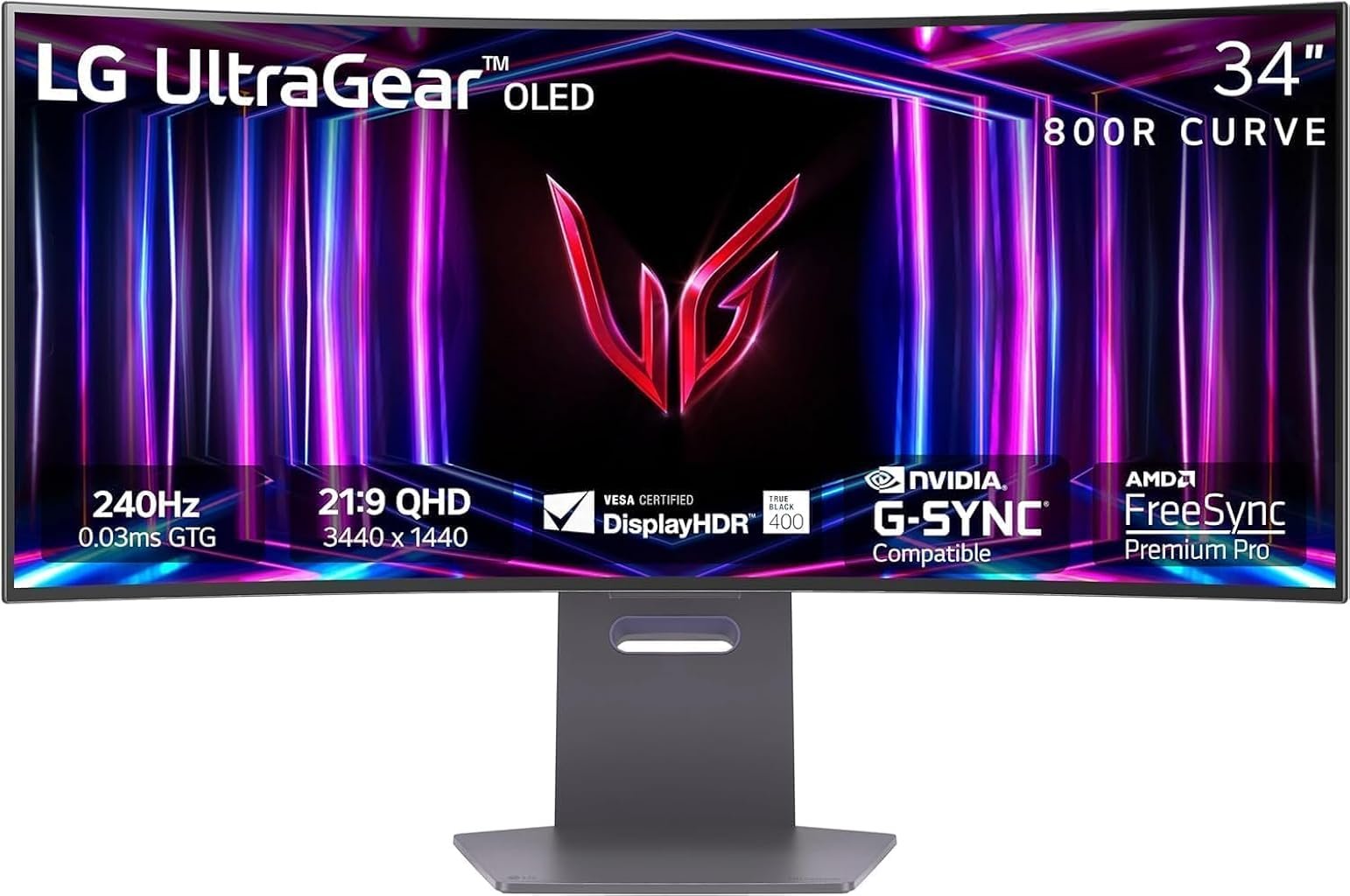
The LG UltraGear 34GS95QE-B sits at an unusually revealing point in the evolution of gaming monitors. Its specification sheet combines a 34-inch 21:9 OLED panel, 3440 × 1440 resolution, 240Hz maximum refresh rate, 0.03ms quoted gray-to-gray response time, an aggressive 800R curvature, adaptive-sync support and VESA DisplayHDR True Black 400 certification. Those numbers make its priorities difficult to misunderstand: this is primarily a gaming display, with immersion and motion performance placed ahead of conventional office versatility.
Our score is 8.31/10, or Very Good. Customer Sentiment is 8.06, Buyer Confidence reaches 9.37, and Value stands at 8.03. Those figures describe a monitor with a fairly clear identity. The 34GS95QE-B makes a persuasive proposition for players who can exploit high refresh rates and appreciate OLED contrast, but its design choices are less universally attractive for productivity, brightly illuminated rooms and buyers seeking a single-cable USB-C workstation.
That distinction matters because premium monitors increasingly try to be everything at once. The 34GS95QE-B largely refuses that compromise. Its strongest attributes are directly connected to gaming, while several of its weaker characteristics emerge when the same hardware is judged as a general-purpose desktop display.
At an evaluated price of $694.99, the balance is considerably more favorable than it would have been near the four-figure prices historically associated with premium OLED ultrawides. The question is no longer whether OLED looks impressive. It is whether this particular combination of OLED, 240Hz operation and extreme curvature makes sense for the person sitting in front of it.
Display Architecture: 34 Inches With a Very Strong Curve
LG’s specifications for the 34GS95QE-B establish the basic architecture: a 34-inch OLED panel with 3440 × 1440 resolution, an 800R curve, refresh rates up to 240Hz and a quoted 0.03ms response time. LG also specifies a typical contrast ratio of 1.5 million to one.
The 3440 × 1440 format remains a sensible resolution for a 34-inch gaming display because it creates a broad 21:9 workspace without imposing the GPU workload of 4K. The panel contains roughly 4.95 million pixels, compared with about 8.29 million at 3840 × 2160. In raw pixel count, 4K therefore asks a graphics processor to render roughly 67% more pixels per frame.
That difference becomes meaningful at 240Hz. Driving modern games toward very high frame rates at 3440 × 1440 is already demanding. Moving the same workload to native 4K would substantially raise the graphics burden.
The more divisive specification is 800R curvature. The radius indicates that the screen follows the arc of a circle with an 800mm radius. This is far more pronounced than the 1800R curvature found on many conventional curved ultrawides.
That geometry changes the experience rather than merely decorating it. When the viewer is positioned appropriately, the side portions of the display angle noticeably inward. Games with broad landscapes, cockpit views, racing environments and large peripheral fields can benefit from that visual enclosure.
The same geometry can be less agreeable when the monitor spends eight hours displaying spreadsheets, browser windows and documents. Straight horizontal lines visibly follow the curved surface, and users accustomed to flat panels may require an adjustment period. Independent testing by RTINGS similarly identifies the aggressive curve as a limitation for office use while rating the monitor much more favorably for PC gaming.
This is therefore not a curve added as a mild stylistic gesture. It materially defines how the monitor is used.
OLED Is the Main Attraction
Refresh rate attracts the larger number on the box, but OLED technology supplies much of the 34GS95QE-B’s visual character.
Unlike LCD displays that illuminate pixels through a backlight, OLED pixels generate their own light and can effectively shut down when displaying black. That property changes dark scenes dramatically. A bright object can sit beside a dark area without the haloing associated with local-dimming zones on many LCD monitors.
LG specifies a 1,500,000:1 typical contrast ratio and DCI-P3 coverage of 98.5%. Regional LG specifications also list typical SDR brightness at 275 cd/m², while the panel carries VESA DisplayHDR True Black 400 certification.
The certification has more substance than its relatively modest “400” label might suggest. Under VESA’s DisplayHDR True Black criteria, True Black 400 requires a 400 cd/m² minimum in the specified small-window test and is built around far lower black levels than conventional DisplayHDR categories.
For gaming, that distinction can matter more than simply chasing the largest brightness number. Space scenes, dim interiors, night environments and high-contrast menus are precisely where self-emissive pixels reveal their advantage.
Brightness remains one of the trade-offs. The 34GS95QE-B is better suited to controlled indoor lighting than a room flooded with direct sunlight. RTINGS found its reflection handling strong but identified limited brightness against intense glare as a weakness.
The practical lesson is straightforward: this OLED’s image is at its most convincing when room lighting is reasonable. A brighter LCD may prove easier to live with beside large uncovered windows during daylight.
240Hz Changes More Than Competitive Games
A 240Hz monitor can refresh the image every 4.17 milliseconds. At 120Hz, that interval is approximately 8.33ms; at 60Hz, it is roughly 16.67ms.
That arithmetic does not mean every player suddenly becomes more skilled at 240Hz. It means the display has more opportunities each second to present updated visual information when the graphics system can supply frames quickly enough.
LG pairs the refresh rate with a claimed 0.03ms GtG response time. Manufacturer response-time specifications should never be interpreted as total system latency, but OLED’s pixel-transition behavior is nevertheless one of its major technical advantages. Independent measurements characterize the 34GS95QE-B’s response behavior as near-instantaneous and its motion presentation as exceptionally crisp.
This combination makes the monitor particularly relevant for shooters, racing games and other fast-moving titles. Yet high refresh rates are not confined to esports. Camera movement in single-player games also appears smoother when frame delivery remains high.
There is an obvious hardware requirement. LG states that reaching up to 240Hz requires a graphics card supporting DisplayPort 1.4 or HDMI 2.1. A buyer running graphically demanding games at maximum settings on a modest GPU will not spend much time near 240 frames per second.
The monitor can still deliver excellent OLED contrast at lower frame rates, but part of the purchase price is paying for speed. Buyers should therefore evaluate the display and GPU as a system rather than treating 240Hz as an isolated feature.
Variable Refresh Rate Helps, but OLED VRR Has a Caveat
The 34GS95QE-B supports AMD FreeSync Premium Pro and is NVIDIA G-SYNC Compatible. Variable refresh rate allows the monitor’s refresh behavior to follow changing GPU frame delivery, reducing the mismatch that creates tearing and some forms of stutter.
NVIDIA describes G-SYNC Compatible displays as monitors validated to provide a “good, basic variable refresh rate (VRR) experience” without using NVIDIA’s dedicated G-SYNC processor.
That compatibility broadens the 34GS95QE-B’s usefulness across modern gaming PCs, but OLED VRR deserves a qualification. Independent testing has found noticeable VRR flicker in dark scenes when frame rates fluctuate.
The problem is not equivalent to ordinary screen tearing. It tends to emerge when frame times vary, particularly in dark content where brightness fluctuations are easier to perceive. A game running at a stable frame rate is less likely to expose it than one repeatedly swinging between substantially different performance levels.
That makes frame-rate consistency valuable even when adaptive sync is enabled. Sensible graphics settings, frame-rate caps and avoiding severe GPU bottlenecks can produce a more stable experience.
HDR Benefits From Black Level More Than Brute-Force Brightness
HDR monitor marketing often reduces performance to peak luminance. OLED makes that comparison less tidy.
A display capable of very high brightness but weak black levels can produce powerful highlights while still losing depth in dark scenes. The 34GS95QE-B takes the opposite approach: individual pixel control gives it exceptionally dark blacks and prevents the blooming around small bright objects that can appear on zone-based LCD backlights.
That means a starfield, neon sign against darkness or bright interface element over a black background can appear remarkably clean.
The DisplayHDR True Black 400 certification establishes a standardized baseline, while LG’s published panel specifications list 98.5% typical DCI-P3 coverage. Those characteristics make HDR gaming one of the stronger reasons to consider this monitor.
Yet expectations should remain calibrated. OLED monitors can alter brightness behavior according to how much of the screen is illuminated, and a full-screen bright scene does not behave like a tiny highlight surrounded by black. Buyers coming from an extremely bright mini-LED display may therefore perceive the LG as restrained in broad bright scenes even while preferring its black levels and absence of blooming.
Connectivity Is Good for Gaming, Less Ambitious for Work
Connectivity exposes the monitor’s gaming-first philosophy.
The 34GS95QE-B provides two HDMI 2.1 connections, one DisplayPort 1.4 connection with DSC, USB upstream connectivity, two USB downstream ports and a four-pole headphone output. It does not provide USB-C power delivery. LG’s detailed regional specifications explicitly list USB-C as absent.
That absence matters more in 2026 than it did several years ago.
A modern USB-C monitor can accept video from a laptop, carry USB data and charge the computer through one cable. For hybrid workers who regularly move a laptop between desk and travel, that convenience can alter the entire desk layout.
The 34GS95QE-B instead behaves more like a traditional high-performance gaming monitor. Desktop PCs connect easily through DisplayPort or HDMI, and current consoles can use HDMI 2.1, but laptop-centric users lose the simplicity of single-cable docking.
There is also no reason to buy a 21:9 ultrawide specifically for a console. Current consoles generally target 16:9 output rather than native 21:9 gaming, meaning the display’s width cannot be exploited in the same way it can on a compatible PC title. Independent testing reports black bars at the sides with consoles.
For PC gaming, the port selection is appropriate. For mixed gaming and professional laptop use, it is merely adequate.
Productivity Is Possible, but Gaming Remains the Better Fit
A 3440 × 1440 ultrawide naturally provides useful horizontal space. Two documents can sit beside each other, a video-editing timeline can stretch across much of the display, and large spreadsheets benefit from additional columns.
Yet the 34GS95QE-B carries three productivity compromises.
First is the 800R curve. It can be immersive in games but visually assertive when dealing with documents and design work.
Second is text rendering. OLED subpixel structures can produce text characteristics that differ from conventional RGB LCD panels. RTINGS specifically reports text-clarity limitations on this model. For gaming interfaces and ordinary mixed use, this may be a secondary concern; for someone reading small text all day, it deserves greater weight.
Third is static-content exposure. OLED panels can experience image retention or permanent burn-in after prolonged uneven pixel wear. LG itself explains that leaving static elements such as taskbars, icons or game menus on screen for extended periods can cause temporary image retention and provides automated and manual image-cleaning functions through OLED Care. LG’s OLED image-cleaning guidance provides further detail.
The risk should neither be sensationalized nor ignored. A gaming PC displaying changing content creates a different usage pattern from a workstation showing the same application chrome for thousands of hours.
LG’s U.S. support documentation lists two years of parts and labor warranty coverage for the 34GS95QE-B. The current warranty information provides useful context for ownership planning.
For mixed use, sensible OLED habits include allowing the panel’s maintenance routines to operate, using sleep settings, avoiding unnecessarily persistent static imagery and not disabling protective functions simply because they are occasionally inconvenient.
Design and Ergonomics
The 34GS95QE-B uses a four-side borderless presentation, an anti-glare/low-reflection coating and LG’s angular UltraGear design language. LG’s 2024 UltraGear launch documentation also identifies height, tilt and swivel adjustment for the 34-inch model.
The physical dimensions deserve attention because 34-inch ultrawides are wide rather than merely large. LG lists the panel at about 784mm across, or just under 31 inches. With its stand, it weighs approximately 9.3kg according to LG’s regional specification sheet.
The 800R curvature also affects desk positioning. Sitting too far away diminishes the logic of such an aggressive arc; sitting at a normal desktop distance better aligns the screen edges toward the viewer.
A VESA 100 × 100mm mounting interface gives owners the option of replacing the supplied stand with a compatible monitor arm. Anyone planning that route should verify the arm’s weight rating and clearance for the curved chassis.
Where the 34GS95QE-B Fits Among the Best 34 Inch Ultrawide Monitors
Any comparison of the best 34 inch ultrawide monitors eventually divides into several priorities: gaming speed, HDR image quality, productivity connectivity, pixel density, curvature and price.
The 34GS95QE-B makes its position unusually obvious.
Its 240Hz refresh rate and OLED response behavior favor gaming. Its per-pixel light control favors dark-room contrast and HDR scenes containing small bright objects. Its 3440 × 1440 resolution strikes a manageable compromise between image detail and GPU workload.
Its weaknesses point in the other direction. There is no USB-C connection. The 800R curvature is more aggressive than many productivity users prefer. OLED carries static-content considerations. Text clarity is not its strongest attribute. Bright-room performance is limited by moderate full-screen brightness.
That mixture explains why a monitor can earn an 8.31/10 overall score without being an automatic recommendation for every premium-display buyer. Specialization produces both its appeal and its limitations.
Interpreting Our Scores
Our 8.31/10 overall score places the LG UltraGear 34GS95QE-B firmly in Very Good territory. The rating reflects a monitor whose gaming fundamentals are stronger than its all-purpose flexibility.
Customer Sentiment at 8.06 suggests broadly positive ownership appeal without erasing the compromises that accompany OLED and aggressive curvature. The score fits a product that can be highly satisfying for the right setup while remaining a questionable choice for users whose priorities center on office work or laptop docking.
Buyer Confidence is substantially higher at 9.37. That is the strongest of our four figures, and the difference is meaningful. The underlying proposition is easy to understand: the monitor has a defined specification, established adaptive-sync support, standardized HDR certification and a two-year U.S. warranty. Buyers can identify what they are purchasing with relatively little ambiguity.
Value scores 8.03 at the evaluated $694.99 price. That is a good result rather than an extraordinary one. OLED, 240Hz operation and ultrawide geometry deliver substantial hardware for the money, but value depends on actually using those capabilities. Paying for 240Hz makes little sense when a system spends most of its time at 60fps, just as paying for an ultrawide OLED is difficult to justify when the display will primarily show static spreadsheets.
The spread between the 9.37 Buyer Confidence score and 8.03 Value score tells the story neatly: confidence in what the monitor is remains higher than confidence that every buyer needs what it offers.
Strengths and Drawbacks
The strongest reasons to choose the 34GS95QE-B are closely connected:
- 3440 × 1440 resolution offers a broad 21:9 field without the rendering load of 4K.
- The 240Hz ceiling gives high-frame-rate PC gaming substantial headroom.
- OLED pixel response supports unusually clean motion.
- Per-pixel illumination produces deep blacks without LCD-style blooming around bright objects.
- DisplayHDR True Black 400 supplies a recognized HDR performance baseline.
- FreeSync Premium Pro and G-SYNC Compatible support accommodate the major PC GPU ecosystems.
- HDMI 2.1 and DisplayPort 1.4 provide appropriate gaming connectivity.
- The evaluated $694.99 price produces a considerably stronger value proposition than premium OLED pricing historically implied.
The drawbacks are equally specific:
- The 800R curvature can feel excessive for productivity.
- USB-C and USB-C power delivery are absent.
- Text rendering is less refined than on many conventional LCD monitors.
- OLED requires more thought around persistent static content.
- Variable-refresh operation can exhibit flicker in difficult dark scenes with unstable frame rates.
- Moderate brightness makes strong ambient light less favorable.
- Consoles cannot exploit the 21:9 format in the same fashion as a compatible gaming PC.
None of these weaknesses invalidates the monitor’s central purpose. They simply narrow the audience.
Who Should Buy It?
The clearest buyer is a PC gamer with a graphics card capable of producing high frame rates at 3440 × 1440, particularly someone who plays a mixture of fast competitive games and visually rich single-player titles.
It also makes sense for players who use their gaming space in controlled lighting and place high value on black levels. Horror games, space titles, dark action games and cinematic releases make particularly effective use of OLED’s ability to place bright pixels directly beside black ones.
A buyer moving from a 60Hz or 75Hz LCD receives several changes at once: a wider aspect ratio, far higher refresh capability, much faster pixel transitions and OLED contrast. The cumulative change can be much more noticeable than a simple resolution upgrade.
The weaker fit is a user primarily buying a work monitor. Someone connecting a laptop every morning, reading text for most of the day and keeping static applications visible for long periods can find better-aligned hardware elsewhere. USB-C power delivery, a gentler curve and conventional RGB text rendering may matter more than 240Hz.
The same caution applies to console-only buyers. HDMI 2.1 compatibility is useful, but paying for a 21:9 panel that consoles cannot fully exploit leaves part of the hardware underused.
Final Considerations
The LG UltraGear 34GS95QE-B is best understood as a focused gaming display rather than a universal premium monitor.
Its central combination remains compelling: 3440 × 1440 OLED, 240Hz refresh capability, 0.03ms quoted GtG response, 800R curvature, DisplayHDR True Black 400, HDMI 2.1, DisplayPort 1.4, FreeSync Premium Pro and G-SYNC Compatible support. Each component pushes the product toward high-performance PC gaming.
The 8.31/10 overall score reflects that strength without overlooking the compromises. Customer Sentiment at 8.06 and Value at 8.03 are positive but measured. Buyer Confidence at 9.37 is considerably stronger because the monitor’s identity is unusually well defined.
That identity should guide the purchase.
For a high-frame-rate PC setup in controlled lighting, the 34GS95QE-B combines speed, contrast and ultrawide immersion in a way conventional LCD monitors struggle to reproduce simultaneously. At the evaluated $694.99 price, the financial barrier to that combination is also much lower than early premium OLED pricing conditioned buyers to expect.
For office-heavy workloads, laptop docking, text-dense applications or bright environments, the same design becomes harder to defend. The lack of USB-C, extreme curve, OLED maintenance considerations and text-rendering characteristics all deserve weight.
The monitor therefore earns its strongest recommendation when purchased for what it clearly prioritizes: immersive and responsive PC gaming. Buyers who match that profile receive most of the benefits that pushed OLED ultrawides forward in the first place, while those seeking a neutral all-day workstation have sound reasons to look elsewhere.